 A2A Fans
Introduction
MCP servers serve as the backbone for AI agents, enabling them to perform a variety of real-world tasks such as reading files, querying databases for information, calling external APIs, or executing custom actions tailored to specific needs. Rather than creating unique, one-off integrations for each individual client, you can develop a single server that can be utilized by any MCP-compatible host, including popular platforms like Claude Desktop, Cursor, Claude Code, and several others.
This comprehensive tutorial provides a detailed walkthrough for constructing a simple yet fully functional MCP server using both Python and TypeScript programming languages. Throughout this guide, you will learn how to expose a tool, define a resource, and optionally create a prompt. Additionally, you will run the server locally on your machine and conduct tests using the MCP Inspector tool. The ultimate aim of this tutorial is to equip you with a solid working foundation that you can further develop and extend for production use in real-world applications.
Key Takeaways
An MCP server exposes three primitives: tools (actions the model can call), resources (data the host can load), and prompts (reusable templates).
Official SDKs exist for Python and TypeScript; both generate schemas from types and keep protocol handling out of your way.
Local development usually uses stdio transport; remote deployments use Streamable HTTP (or related HTTP transports).
Start narrow: one clear tool with good descriptions and strict inputs beats a large, vague surface.
Security and permissions are your responsibility; scope what the server can touch.
What You Are Building
A small “demo” server that:
Exposes an add tool (two numbers → sum).
Exposes a templated resource greeting://{name}.
Optionally exposes a simple prompt.
You will run it locally and call it from the MCP Inspector so you can see the full loop before wiring it into an agent host.
Prerequisites
Python path
Python 3.10+
uv recommended (or pip)
Node.js available if you use MCP Dev (Inspector is a Node app)
TypeScript path
Node.js 18+
npm, pnpm, or yarn
Basic TypeScript familiarity
Both
- An MCP-capable client later (Claude Desktop, Cursor, etc.) is useful but not required for the first test.
Core Concepts in 60 Seconds
| Primitive | Who drives it | Purpose |
|---|---|---|
| Tool | The model | Perform an action (API call, calculation, write) |
| Resource | The application | Supply data/context (files, records, docs) |
| Prompt | The user | Reusable message template |
MCP is the protocol between the host/client and your server. Your job is to implement the primitives cleanly; the SDK handles JSON-RPC, discovery, and transport details.
Part 1: Build an MCP Server in Python
Step 1: Create the project
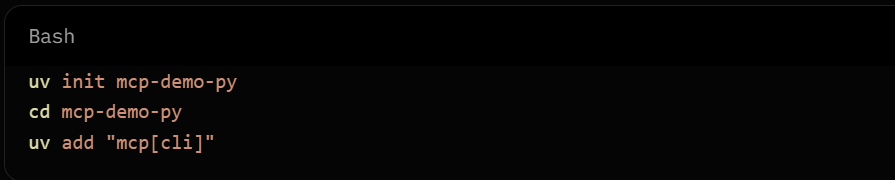
Or with pip:

Step 2: Write the server
Create server.py:
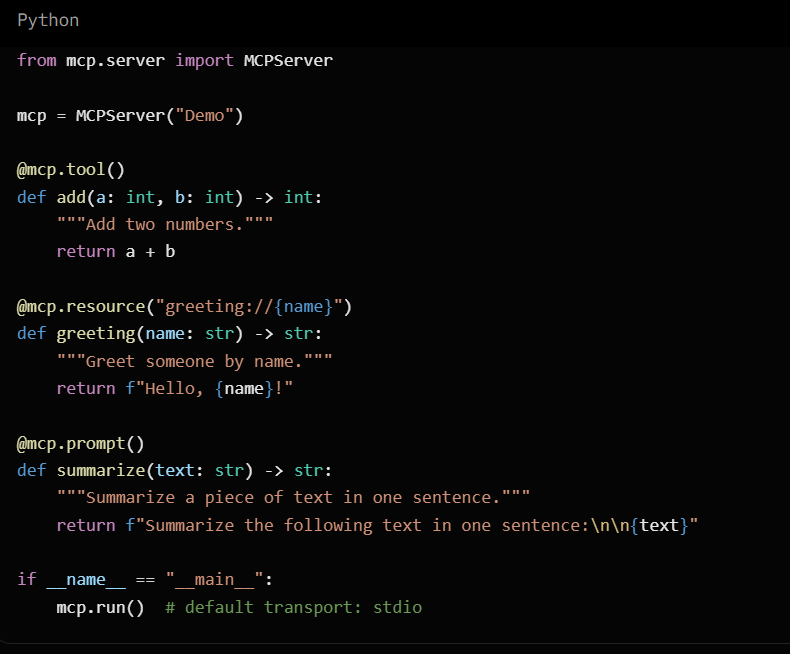
Notes:
Type hints become the input schema.
The docstring becomes the tool/resource description the model sees.
if name == "main" keeps imports from accidentally starting the server.
(Depending on SDK version, you may also see FastMCP used in older examples; the current high-level pattern centers on MCPServer + decorators.)
Step 3: Run and inspect

Open the Inspector URL; it prints. Under Tools, call add with a=1, b=2. You should get 3. Under Resources, try greeting://Ada.
Step 4: Run for real hosts (stdio)
For Claude Desktop or similar local hosts, point the host config at your server command, for example:
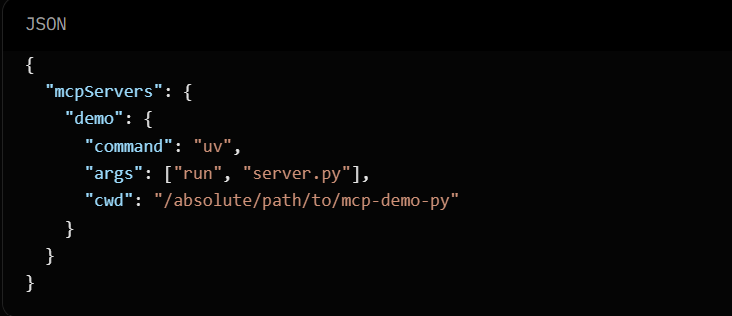
Exact config shape varies by host; the important part is that the host launches your process and speaks MCP over stdio.
Part 2: Build an MCP Server in TypeScript
Step 1: Create the project
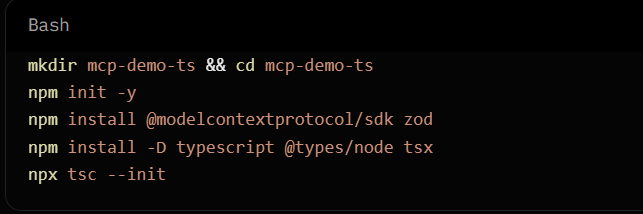
Adjust tsconfig.json for Node/ESM or CommonJS as you prefer. Many examples use ESM ("type": "module" in package.json).
Step 2: Write the server
Create src/server.ts (shape may vary slightly by SDK minor version; this matches the common high-level pattern):
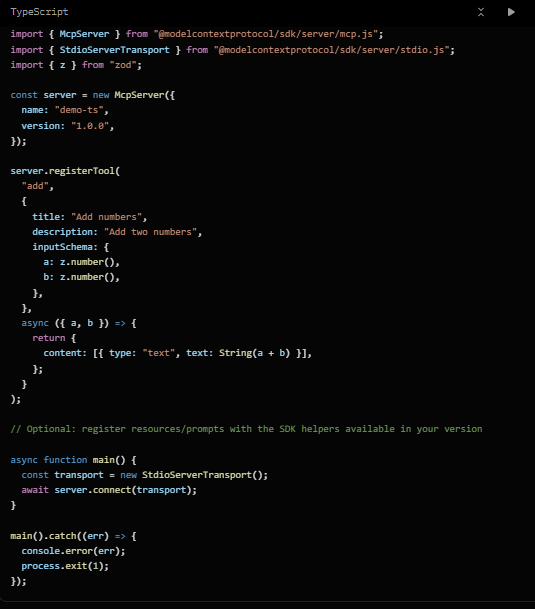
Zod (or the SDK’s schema helpers) defines the tool inputs the host advertises to the model.
Step 3: Run

For development with Inspector, follow the current TypeScript SDK docs for the recommended inspector launch path (often via a small runner or mcp tooling if available in your setup).
Wire the compiled or tsx command into your host’s MCP server config the same way as the Python exam
Tools vs Resources vs Prompts: When to Use Each
Tool: The model should decide to act (search, write, calculate, call an API).
Resource: The host/application should load data into context (config file, user profile, document).
Prompt: The user picks a named template (slash-command style).
Do not turn every data read into a tool if a resource is the better fit. Do not hide side effects inside resources.
Testing Checklist
Inspector can list tools/resources/prompts.
Tool calls validate bad inputs (wrong types rejected).
Descriptions are clear enough that a model can choose the tool correctly.
Errors return useful messages without leaking secrets.
Server starts cleanly under stdio and exits cleanly when the host closes the pipe.
Moving Beyond the Demo
Add a real tool
Replace "add" with something useful: query a database, hit an internal API, or read a scoped directory. Keep permissions narrow.
Choose a transport
stdio: best for local desktop hosts that spawn your process.
Streamable HTTP: better for remote or multi-client deployments.
Structure the project
Separate tool implementations from server wiring. Add logging, timeouts, and input validation at the boundary.
Package it
Publish an installable package or provide a one-line run command so others can add your server to their host config.
Security and Production Practices
Least privilege: only the files, APIs, and credentials the tool needs.
Validate and sanitize all inputs; never trust model-provided paths or SQL fragments.
Do not embed long-lived secrets in the server if you can use the host’s secret surface or short-lived tokens.
Log tool name, latency, and success/failure (avoid logging sensitive payloads).
Rate-limit and time-bound external calls.
Treat the server as part of your threat model: anything the model can invoke, an attacker who influences the model may try to invoke.
Common Pitfalls
Vague tool descriptions → model picks the wrong tool or never calls it.
Overly broad filesystem or network access.
Blocking the event loop on long operations (use async and timeouts).
Forgetting the if name == "main" guard in Python.
Returning unstructured blobs when a clear text or structured result would help the model.
How This Fits the Wider Agent Stack
MCP servers are designed to equip a single agent with a variety of essential tools and relevant data. In scenarios where multiple agents are required to collaborate effectively across different teams or vendors, specialized agent-to-agent protocols, such as A2A, are employed to manage the processes of discovery and the hand-off of tasks.
It is common for many production systems to utilize both approaches: the MCP framework operates downward into various tools, while the A2A protocol facilitates communication and collaboration sideways between the agents involved.
Conclusion
Building an MCP server is straightforward with the official SDKs: define tools (and resources/prompts) with clear types and descriptions, run over stdio for local hosts, and test with the Inspector before connecting a full agent. Start with one reliable tool, tighten permissions, then expand.
The quality of your server is measured less by how many tools you expose and more by how safely and predictably an agent can use them to finish real work.
Frequently Asked Questions
- What is an MCP server?
A process that speaks the Model Context Protocol and exposes tools, resources, and/or prompts to MCP-compatible AI hosts.
- Do I need both Python and TypeScript?
No. Pick the language that matches your stack and the systems you need to call.
- What transport should I use first?
stdio for local development and desktop hosts. Move to HTTP-based transports when you need remote access.
- How do I connect the server to Claude or Cursor?
Add a server entry in the host’s MCP configuration that launches your command (and working directory) so the host can speak MCP over stdio or the configured transport.
- Can one server expose many tools?
Yes. Keep the set focused; too many similar tools can confuse tool selection.
- Are MCP servers secure by default?
No. The protocol standardizes communication; you must enforce authentication, authorization, validation, and least privilege.
- What is the difference between a tool and a resource?
Tools are model-invoked actions. Resources are application-loaded data for context.
- Where should I go next?
Official SDK docs (Python and TypeScript), the MCP Inspector, and a small real tool against one internal system you already trust.